01Brooklyn Health
Willis eCOA
About
Mental health trials depend on clinician-scored interviews that are hard to standardize. Willis checks each score with AI and a secondary clinician, and builds that check into one platform where sites run their trials and sponsors and CROs track study health.
I designed the product and brand from 0→1, then grew it from 25 product areas at the MVP to 40+ over almost two years.
- Role
- Design Director
- Product
- Clinical trial SaaS
- Disciplines
- Design leadershipUX researchStrategyDes opsBrand identity
- Platform
- Web + iOS
- MVP launch
- May 2025
- Regulations
- 21 CFR Part 11HIPAAGDPRGCP
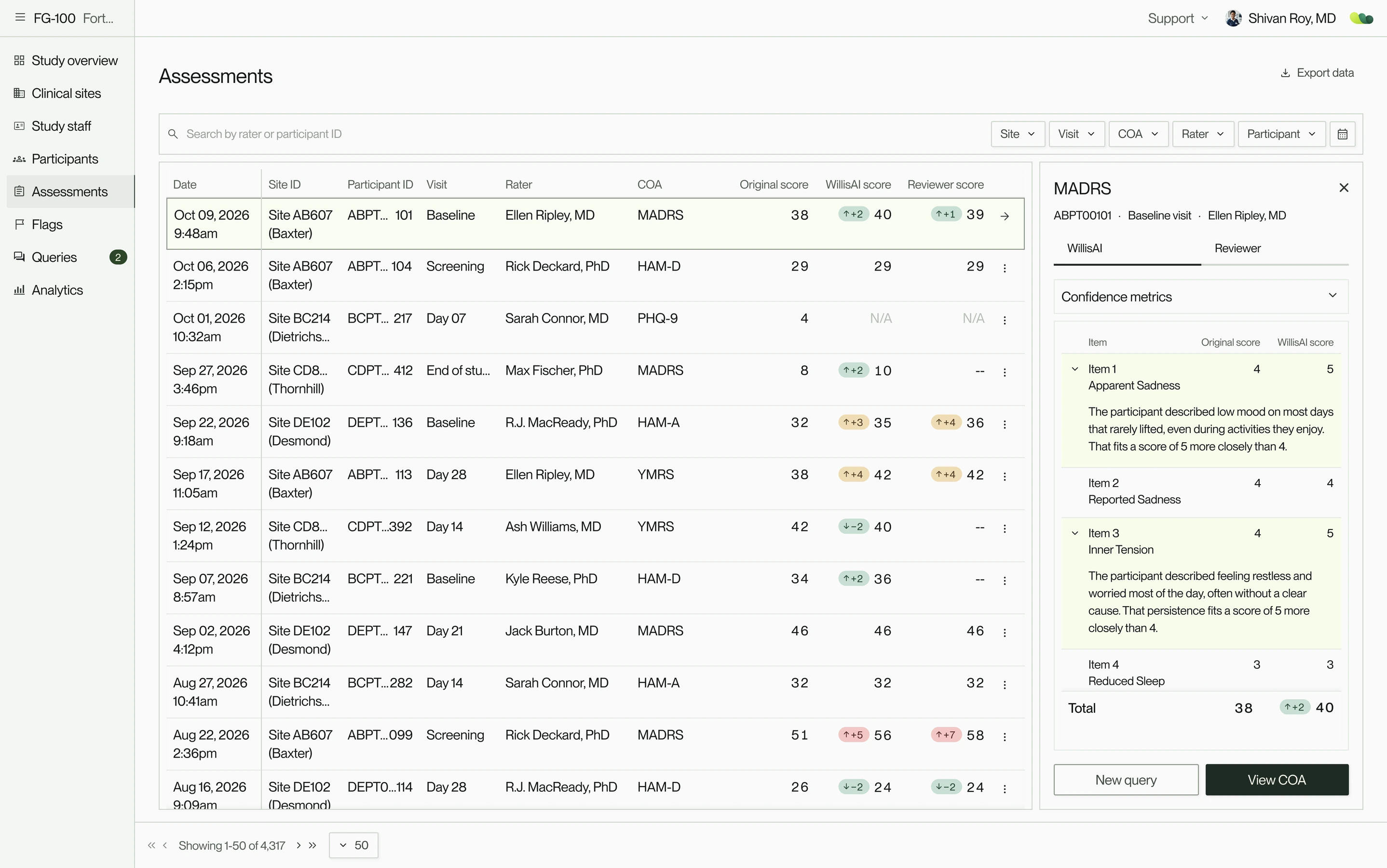
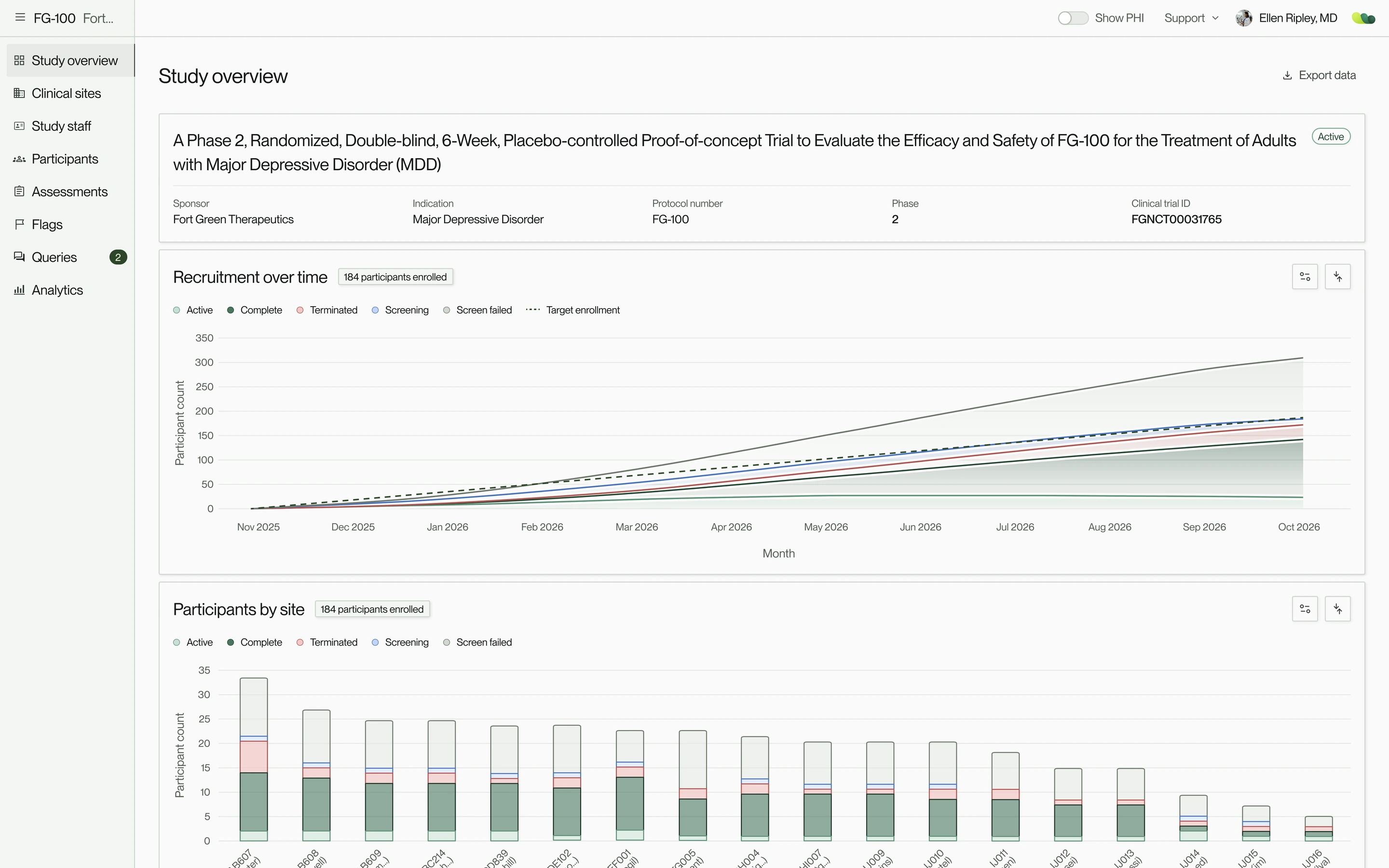
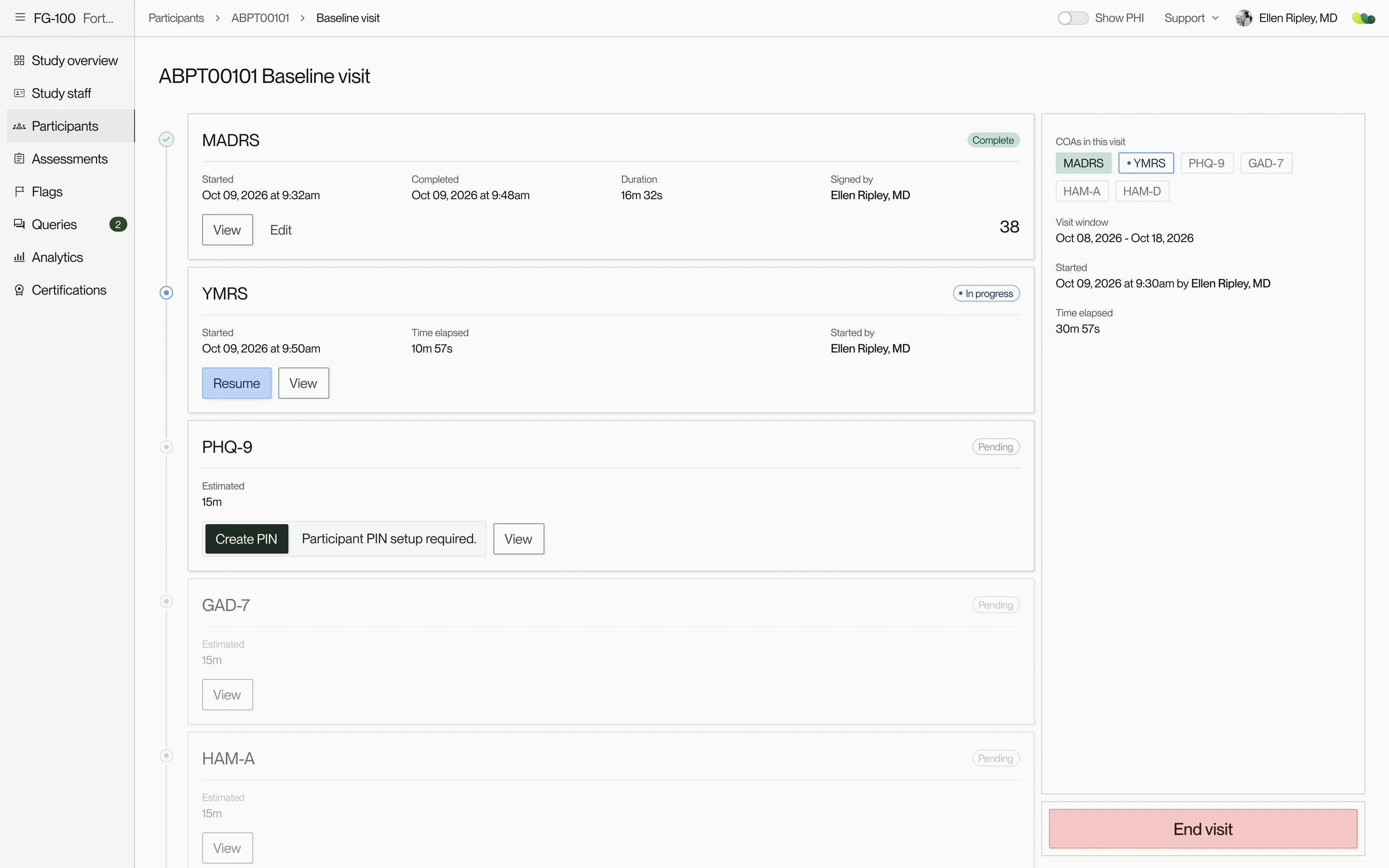
Background
Psychiatric symptoms overlap across conditions and subtle changes can go unnoticed, so people are often misdiagnosed or cycle through medications until one works. CNS1 trials meet the same difficulty in measuring a drug’s efficacy. More reliable scoring means clearer evidence and, in time, more precise treatment.
Every role’s attention belongs on the trial itself, so each screen had to ask for as little of it as possible, which put design at the center of the work. I owned the design decisions across every product area and permission layer, from research and strategy to UX and UI. I shaped the design system, processes and, alongside Product and Engineering teams, the operations that made work at that scale feasible.
I was the sole designer through the MVP launch, then hired a second designer and set up the design operations to keep pace with how fast the product grew.
- 1CNSCentral nervous system, conditions like Alzheimer’s, depression, schizophrenia, Parkinson’s.
Nov 2024
Learning about the world of clinical trials
I started with immersion: regulatory training, the persona research I inherited, and recorded interviews with sponsors and clinicians to understand each role more deeply.
The research revolved around 7 roles, each sitting somewhere between the participant and the data. Participants answered their own questionnaires. Raters focused on participants and their own training, and coordinators on enrollment and scheduling. PIs2 covered participants and data, plus how their raters performed. Sponsors and CROs3 focused on data across sites, and our ops team on setting up studies and keeping them running.
From what we had in writing and recordings, I mapped the product plan, core workflows and permission matrices to see where more research was needed. We hadn’t hired a front-end engineer yet, so I set up a starter UI kit, built on Untitled UI, for when one joined.
The persona research gave a general profile of sponsors, PIs, coordinators and clinicians, and the recordings were of the founder’s own interviews. Our own sessions in December filled in more. I also inherited detailed product requirements. The initial team was small: a PM, a few scientists and a CTO with a couple of back-end engineers.
- 2PIPrincipal investigator: the doctor who leads a trial at a clinical site and is responsible for its participants and site team.
- 3CROContract research organization: a company that sponsors hire to run all or part of a trial, from managing sites to handling the data.
Multiple site access
Judge or run the whole study, never see PHI
Sponsors
Is the study healthy across every site?
- Full access
- Scores
- Sites
- All
- Certifications
- All raters’ status
- No access
- PHI, Staff
CROs
Keeping sites on track for the sponsor
- Full access
- Scores
- Sites
- All that are permitted
- Staff
- CRO staff, if admin
- Certifications
- All raters’ status
- No access
- PHI
Brooklyn Health ops
Setting up studies and keeping them running
- Full access
- Scores, Staff
- Sites
- All
- Certifications
- All raters’ status, with override
- No access
- PHI
Single site access
Care for participants with as much PHI as the study allows for those permitted access.
Principal investigators (PIs)
Their participants, the study data, and how their raters perform
- Full access
- Scores
- PHI
- As configured
- Sites
- Own site (can be multi)
- Staff
- If admin
- Certifications
- All raters’ status
Raters
The participant in front of them, their own data, and their certification
- Full access
- Scores
- PHI
- As configured
- Sites
- Own site
- Staff
- If admin
- Certifications
- All raters’ status; updates their own, and their own training
Coordinators
Enrolling participants and keeping visits on schedule
- Full access
- Scores
- Sites
- Own site
- Staff
- If admin
- Certifications
- All raters’ status
- No access
- PHI
In the visit room
Answer own questionnaires on site tablet, then hand it back to their clinician.
Participants
Completing their own questionnaires
- No access
- Scores, PHI, Sites, Staff, Certifications
Dec 2024
Product plan mapped, assumptions tested, and core workflows validated
7 roles meant 7 versions of every flow, more than our timeline allowed. So we designed most flows twice: once for sponsors, CROs and our ops team watching many sites, and once for site staff running visits.
Walking both groups through mid-fidelity screens of every core flow showed how much still lived on paper: PHI4 in a physical book, notes on loose sheets, certifications and past visits in binders. Even clinicians with permission were uneasy seeing PHI on screen.
Analogue vs in-app
We had planned full participant management in Willis: names, dates of birth, contact details and, for participants who needed one, a care partner. In testing, a few sites were keen to use it. Most wanted control over what they entered, so PHI became configurable per study, with a participant ID as the only requirement. Notes moved into each assessment, and sites were relieved that having certifications and past visits in the app meant less time tracking down binders and files.
What we cut
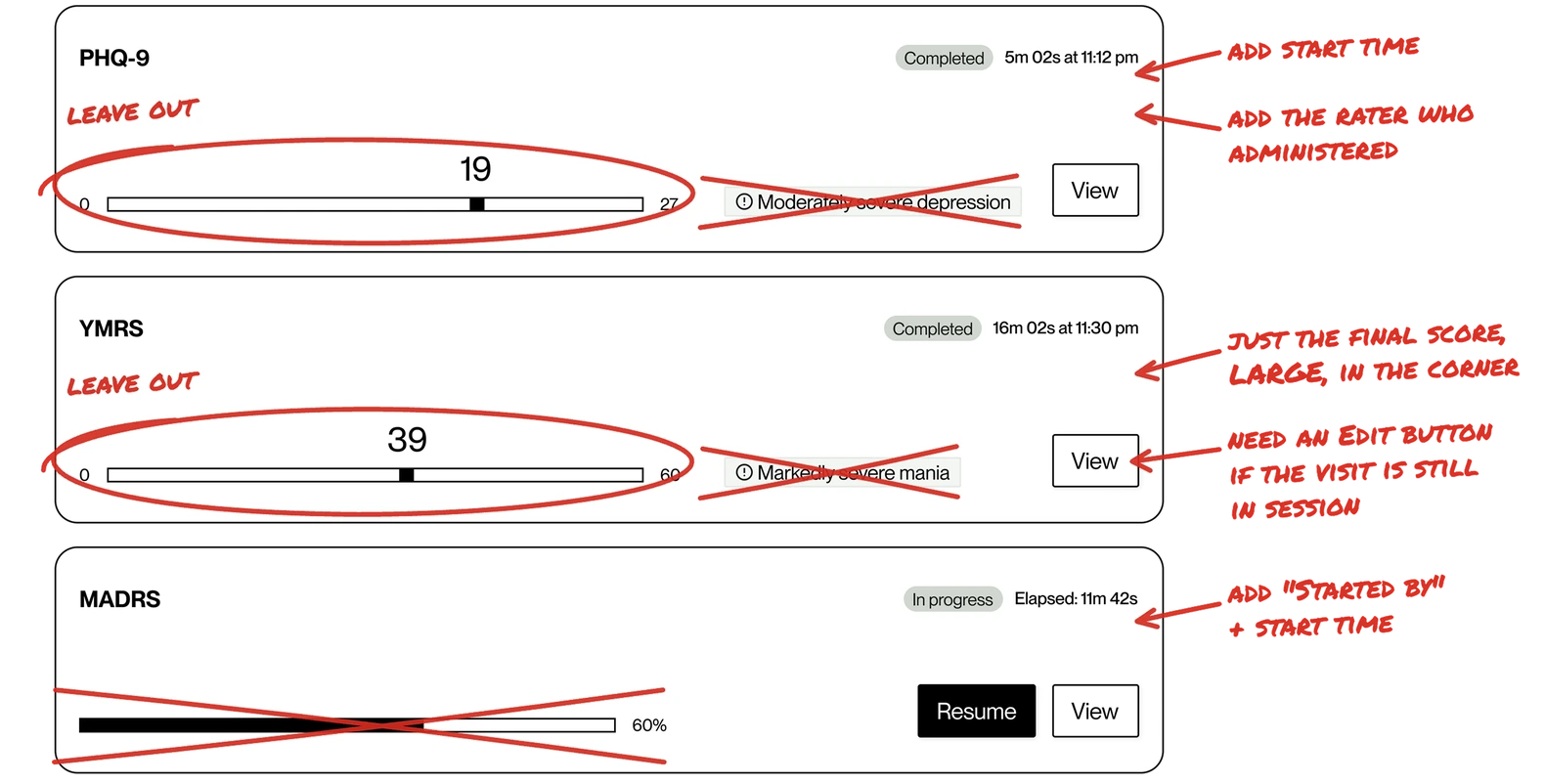
On a participant’s visit page, each assessment is a card showing its status, rater and score. Our early cards also showed where the score fell on the scale’s range, with its severity label (e.g., MADRS5 19 = mild depression). Raters read a visit as a whole and already knew what the numbers meant, so the marker and label were noise that could mislead. We kept the score alone.
- 4PHIProtected health information: anything that identifies a participant, such as their name, contact details or medical records.
- 5MADRSMontgomery–Åsberg Depression Rating Scale: a clinician-rated scale, widely used in trials, for measuring how severe a participant’s depression is.
- At site:
PHI in a physical book
Kept apart from everything else
In Willis:Configurable PHI
Set per study, by the site’s preference
- At site:
Notes on loose sheets
Written during the interview
In Willis:A note on each item of a clinician-rated assessment
Saved with the assessment, on record for audits
- At site:
Certifications in binders
With expiry dates, resubmitted for every new study or retrained before onboarding could start
In Willis:Rater certification profiles
A certification follows the rater from study to study
- At site:
Past visits in binders
Looked up by hand when a past visit needed checking
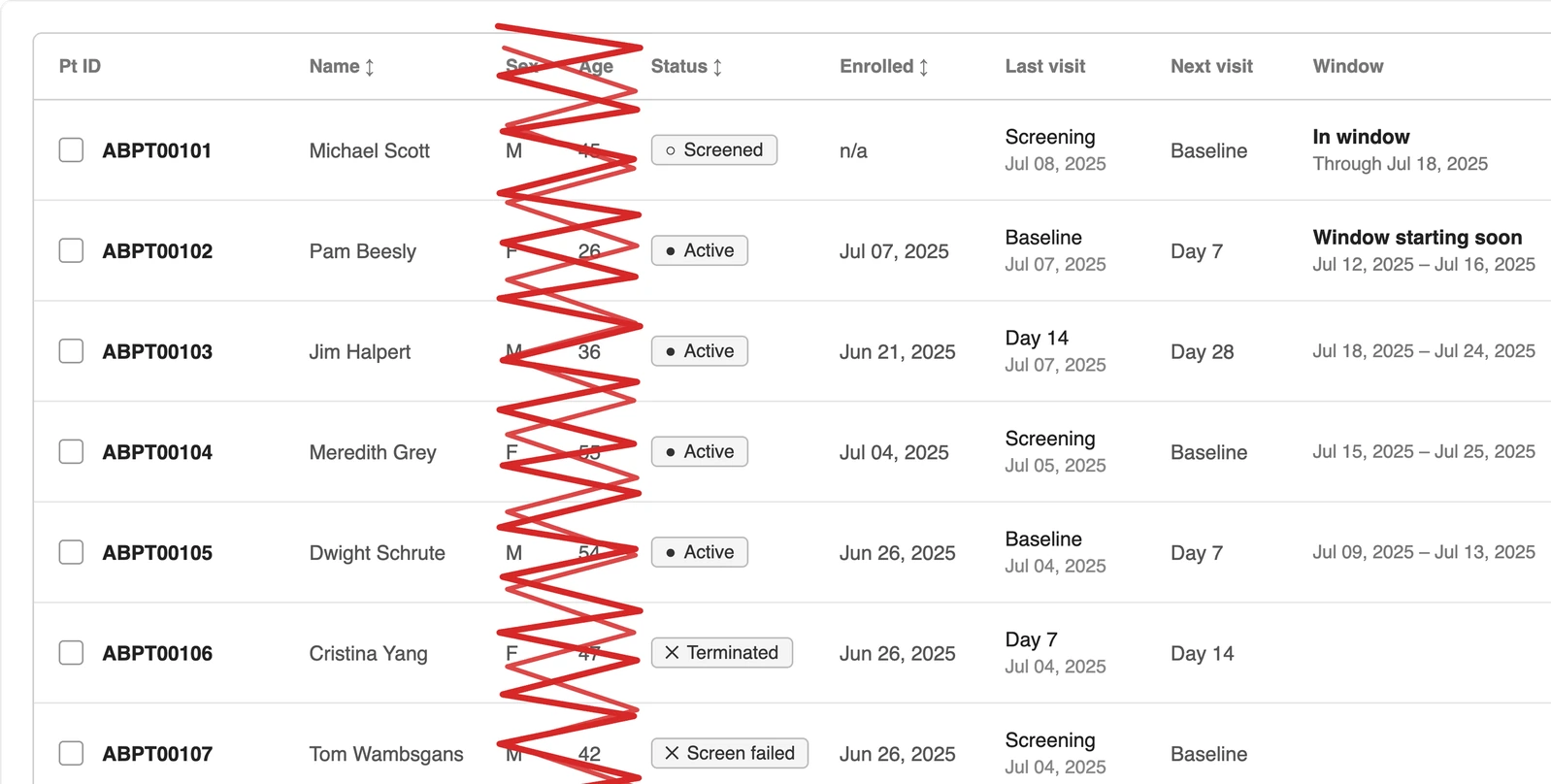
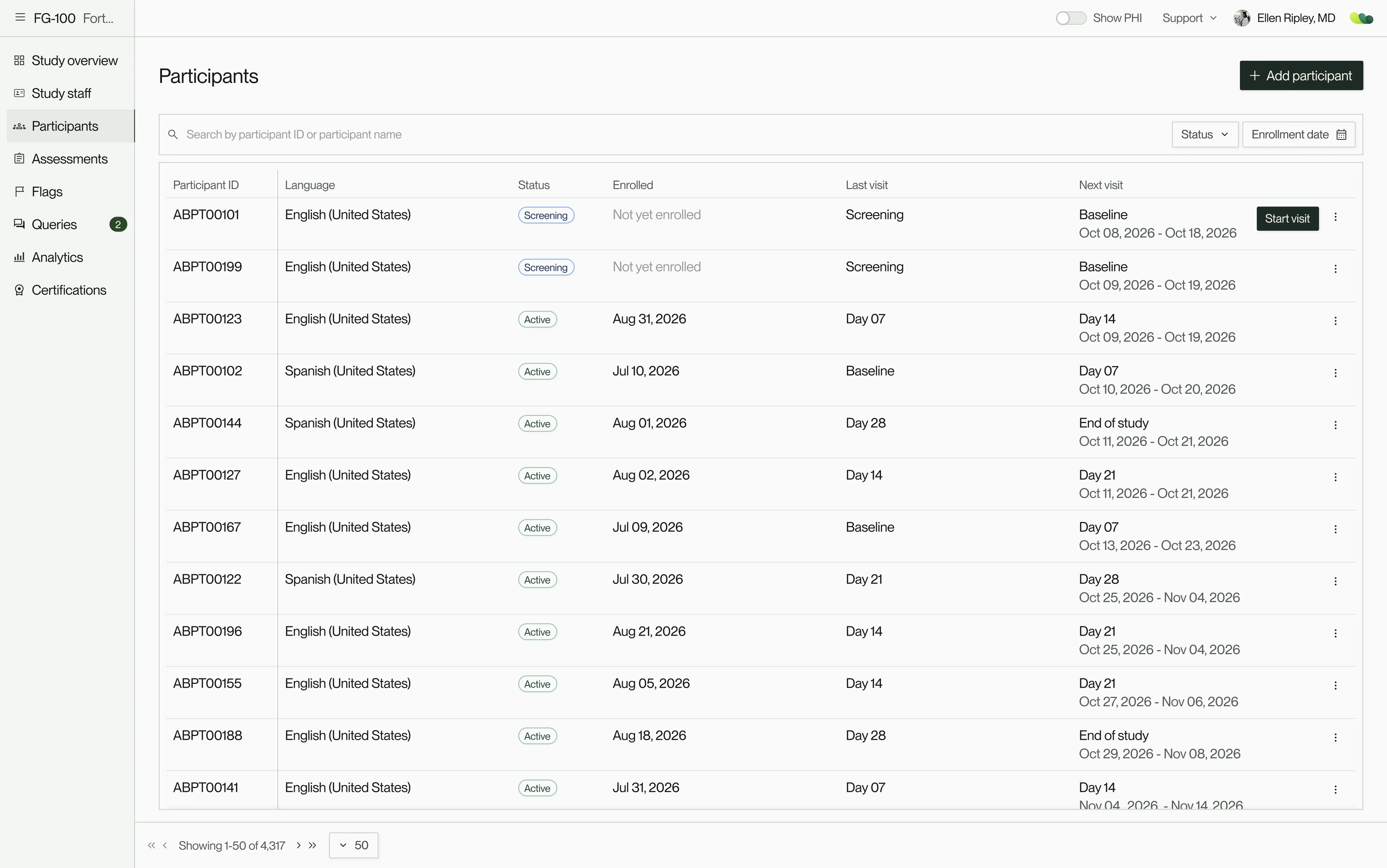
In Willis:One participant table, sorted by next visit window
Open and upcoming visit windows first
- At site:
EDC (electronic data capture)
The study’s case report forms
In Willis:Stayed where it was
An established system; Willis took on the clinical outcome assessments alongside it
Dec 2024
Introducing users to WillisAI
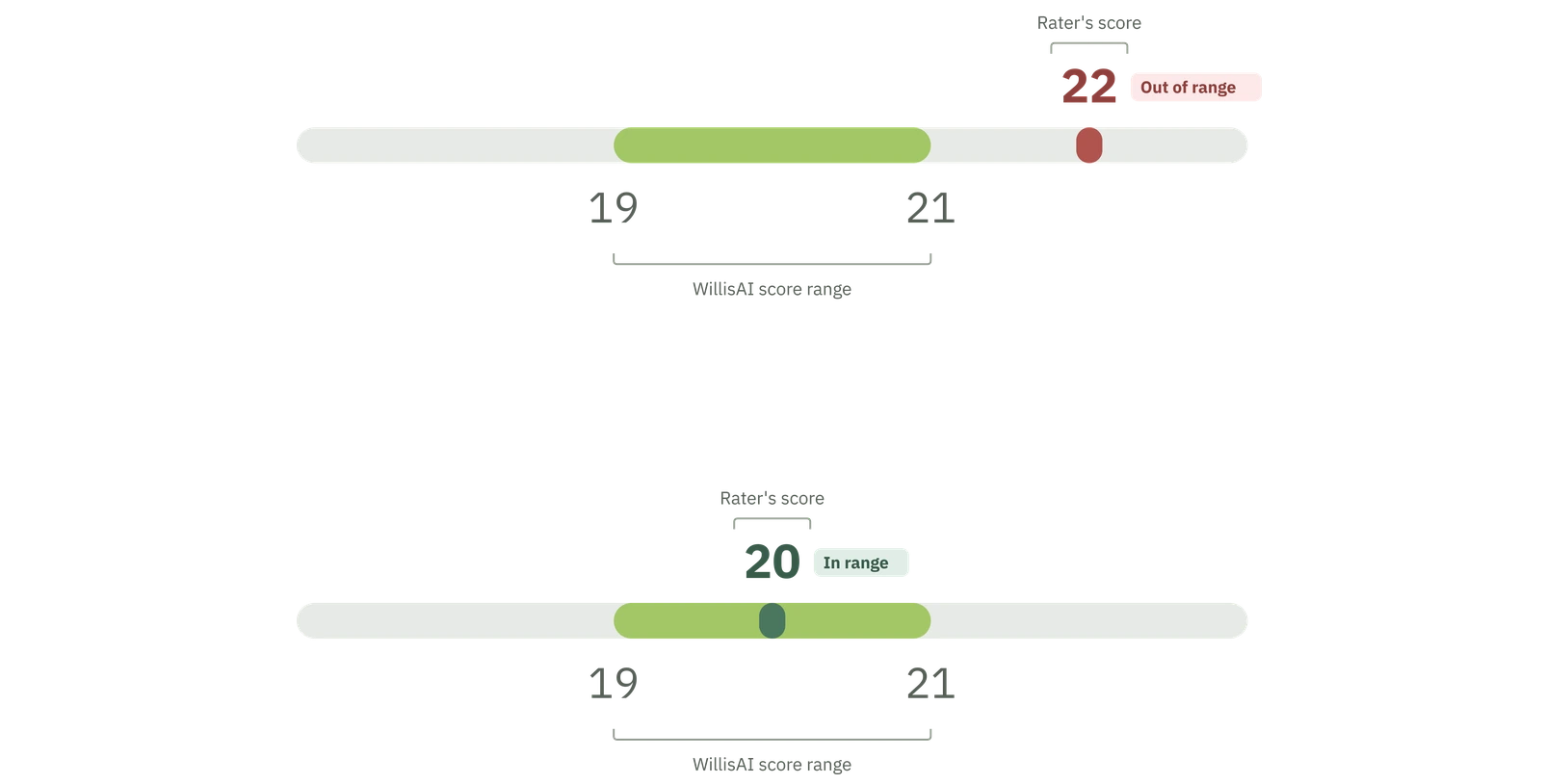
To test the response to an AI score placed beside the raters’, we started with a slider to show the comparison between the two scores: WillisAI’s range as a band, with the rater’s score marked against it.
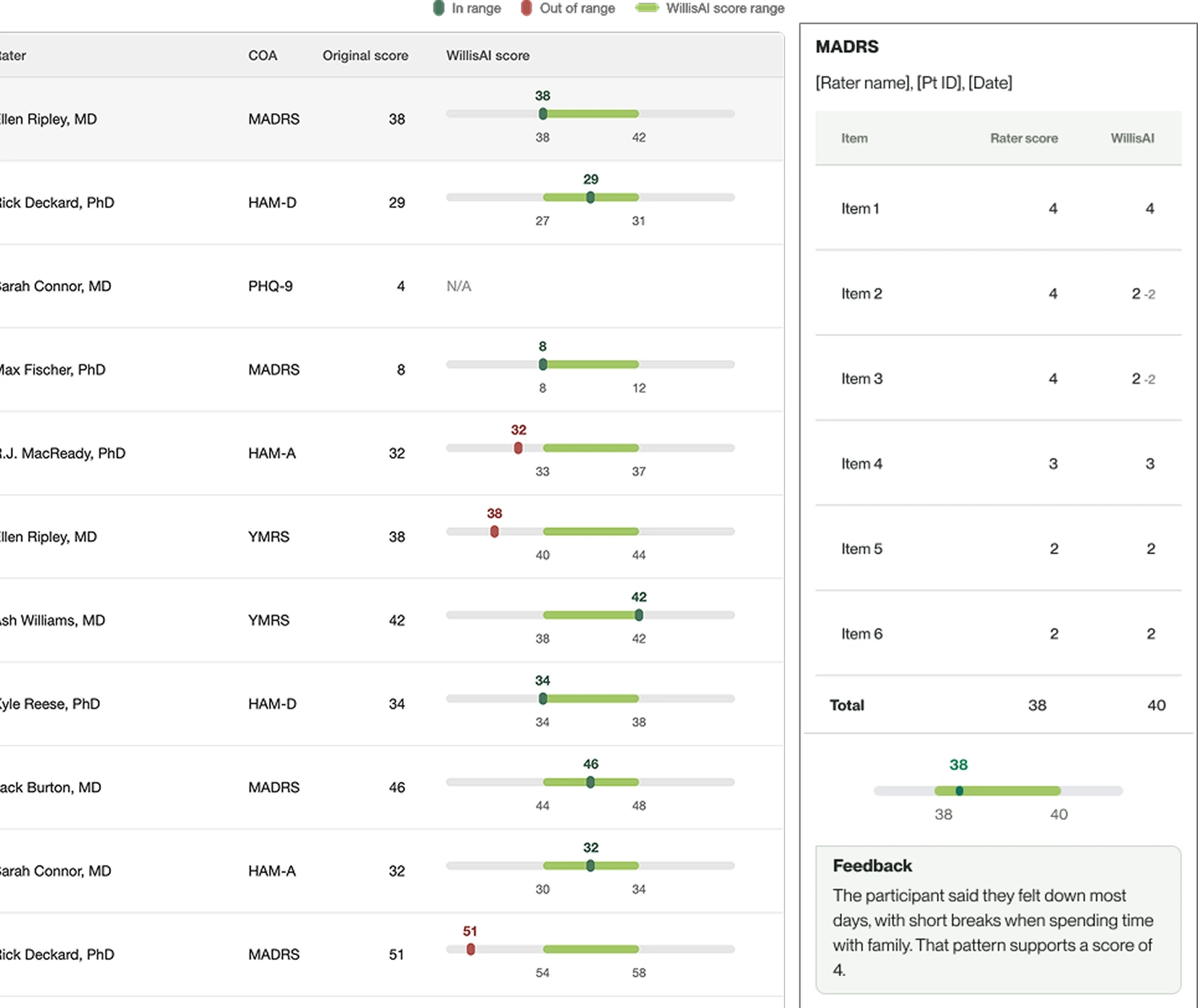
The same two numbers read differently depending on who was reviewing. Sponsors saw another layer of evidence behind every score in their study. Raters and PIs saw their judgment graded against a single recording of a participant they had seen visit after visit. That made the item-by-item breakdown we’d already planned more important: WillisAI had to show the reasoning behind its score, so raters could treat it as a second opinion to check against their own.
Jan 2025
A launch date is set for May 2025, MVP scope narrows to fit
Initial requirements described a far larger platform than we could build by May, so we kept only what a visit needed to run from site to WillisAI to sponsor.
For sites, that meant profiles, visit timelines and an assessment template most ClinRO and PRO scales could be built into. Raters would see their certification status on each required scale and train for the rest. Sponsors would follow the study through an overview, flags and analytics, each score beside WillisAI’s. Queries and data change requests, which question or correct data after a visit, were tabled for later releases.
The launch was timed to the ASCP6 conference in late May. Real visits came first, since WillisAI needed recordings to evaluate. Only qualified clinicians could run them, so staff management put certified raters on each study, and rater profiles showed sponsors who was ready to rate.
Development and staging ran on mock data, analytics included, so we could build and demo before a single real visit, with no participant data outside production.
- 6ASCPAmerican Society of Clinical Psychopharmacology, whose annual meeting draws trial sponsors, CROs and researchers.
The product map as MVP scoping closed in January 2025
- Had mid-fidelity designs
- Slated for the MVP
- Deferred out of initial MVP scope
- Willis
- Organization (Slated for the MVP)
- Org info (Slated for the MVP)
- Users (Slated for the MVP)
- Account (Slated for the MVP)
- Personal info (Slated for the MVP)
- Login & security (Slated for the MVP)
- Experience (Slated for the MVP)
- Support (Slated for the MVP)
- Terms of Use (Slated for the MVP)
- Privacy Policy (Slated for the MVP)
- Study (Had mid-fidelity designs)
- Study overview (Had mid-fidelity designs)
- Clinical sites (Had mid-fidelity designs)
- Participants (Had mid-fidelity designs)
- Add participant (Had mid-fidelity designs)
- View participant (Had mid-fidelity designs)
- View visit (Had mid-fidelity designs)
- ClinROs (Slated for the MVP)
- MADRS (Slated for the MVP)
- eSignature (Slated for the MVP)
- PROs (Slated for the MVP)
- GAD-7 (Slated for the MVP)
- PHQ-9 (Slated for the MVP)
- Staff (Had mid-fidelity designs)
- Add staff (Had mid-fidelity designs)
- Profile (read only) (Had mid-fidelity designs)WIP
- CRO staff (Slated for the MVP)
- Site staff (Slated for the MVP)
- DCR (Deferred out of initial MVP scope)Deferred out of initial MVP scope
- Create DCR (Deferred out of initial MVP scope)
- New DCR (Deferred out of initial MVP scope)
- View DCR (Deferred out of initial MVP scope)
- Queries (Deferred out of initial MVP scope)Deferred out of initial MVP scope
- Create query (Deferred out of initial MVP scope)
- Completed COAs (Had mid-fidelity designs)
- Flags (Had mid-fidelity designs)
- View COA review (Had mid-fidelity designs)
- Analytics (Had mid-fidelity designs)
- Clinical measures (Slated for the MVP)
- Flags (Slated for the MVP)
- Enrollment (Slated for the MVP)
- Certification (Had mid-fidelity designs)
- Training module (Slated for the MVP)
Feb 2025
Choosing the tech stack and designing to what it could ship
Our front-end engineer finally joined at the end of February. My starter UI kit was planned around Tailwind and React. Their component libraries covered our UI, but syncing them with our Figma tokens meant building that pipeline ourselves, more time than our launch date allowed. Together we moved it to PrimeVue: a library just as broad, with a ready-made, customizable way to carry our Figma tokens into code.
Where our designs didn’t match PrimeVue, we simplified: tables and filters were pared down to what it could ship natively, and patterns that needed heavy customization were deferred.
Engineering needed designs the moment the stack was settled. Over those weeks I moved every design from Untitled UI to PrimeVue’s Figma kit and handed off screens as each one was ready to build.
Mar 2025
Closing a gap in onboarding
Onboarding turned out more complex than anticipated, largely because of regulation. Under 21 CFR Part 117, each electronic signature in a trial must belong to one verified person, so every account needed a confirmed identity before anyone could sign anything.
That made a forwarded invitation a real risk: whoever held it could set a password first, lock out the intended user and strand the account. So an emailed code came before any credential, and no one counted as logged in until they’d verified.
Brooklyn Health set up each organization (a sponsor, CRO or site) and named its admin, who was invited first, finished the organization’s details, then invited their own staff. Each account had one email but could belong to several organizations, so an admin of more than one had to complete each organization’s details.
Password creation moved from the first screen into personal details, closing the window where an unverified account already had a credential. Anyone who left after verifying lost what they’d entered, so invitations stayed valid for 72 hours, and users could request a new one or their admin could resend it. SSO users authenticated through Google or Microsoft, so only password users required MFA.
We also planned a PIN so raters sharing a visit could pass one tablet without a full logout. We planned to provide sites with tablets once the iOS app launched, so like most iOS flows, the PIN was tabled until after the MVP.
- 721 CFR Part 11The FDA rule for electronic records and signatures: how a system verifies who people are, protects records and keeps an audit trail.
- Org adminSends the inviteWith the person's role.
- EmailInvite arrivesExpires after 72 hours. Admins can resend it.
- Verification firstEmailed codeProves the inbox is theirs.
- SSO usersSign in with Google or MicrosoftThe identity provider handles authentication.
- Password usersDetails and passwordOne step instead of two.
- Password usersSet up MFAAuthenticator app at MVP.
- New org onlyAdd org infoThe site admin enters their organization's details. Everyone else skips it.
- Signed inIn WillisOnly now do they count as logged in.
Original plan · tossed, joined to Add org info ↑
- First screenSet a passwordBefore anything was verified.
- ThenVerify emailToo late: the account already had a credential.
- ThenPersonal detailsA separate step. Too long, so it merged with the password.
- ThenAdd MFAProtected an account that might not be theirs.
Apr 2025
Designing the assessment
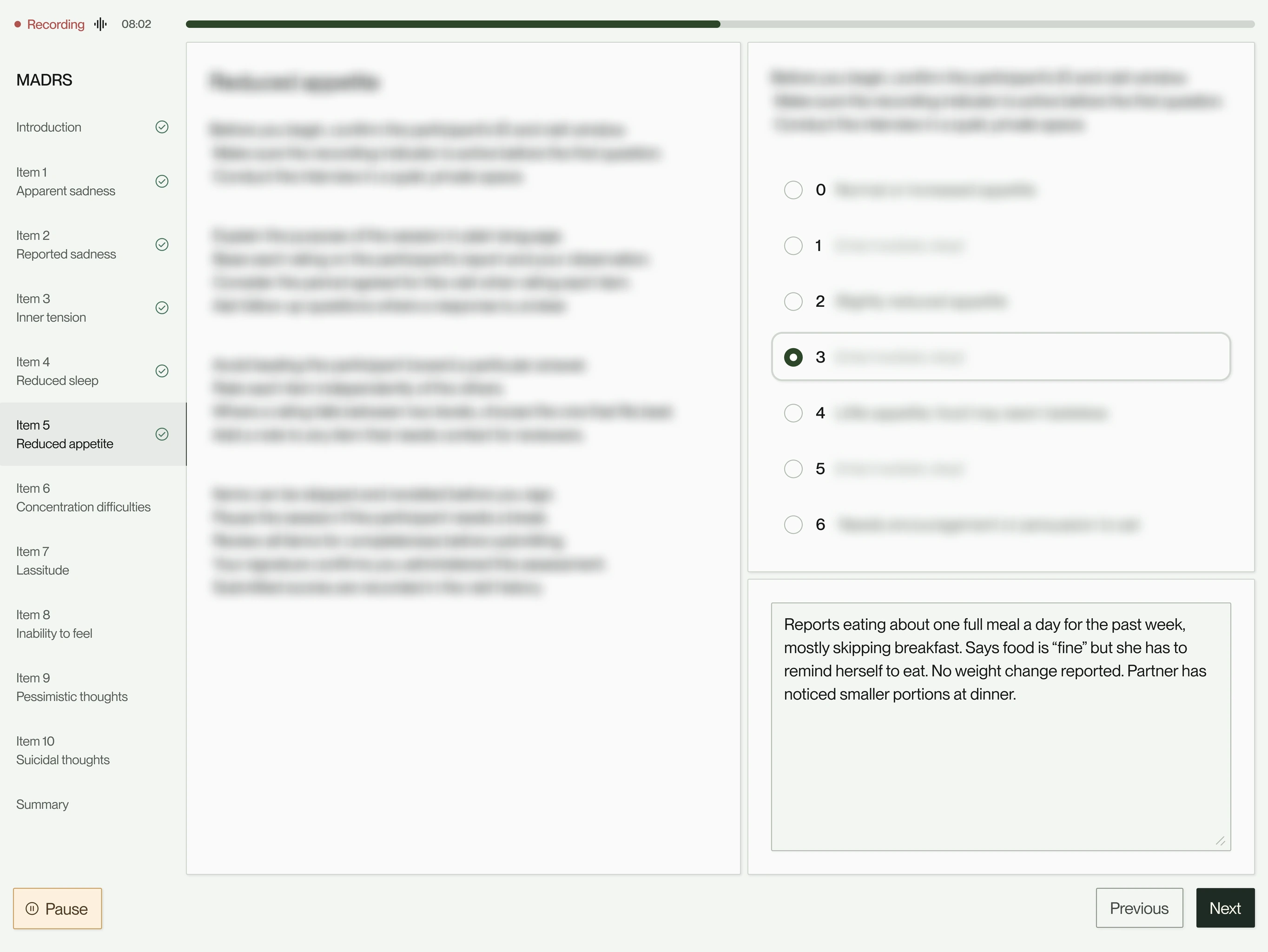
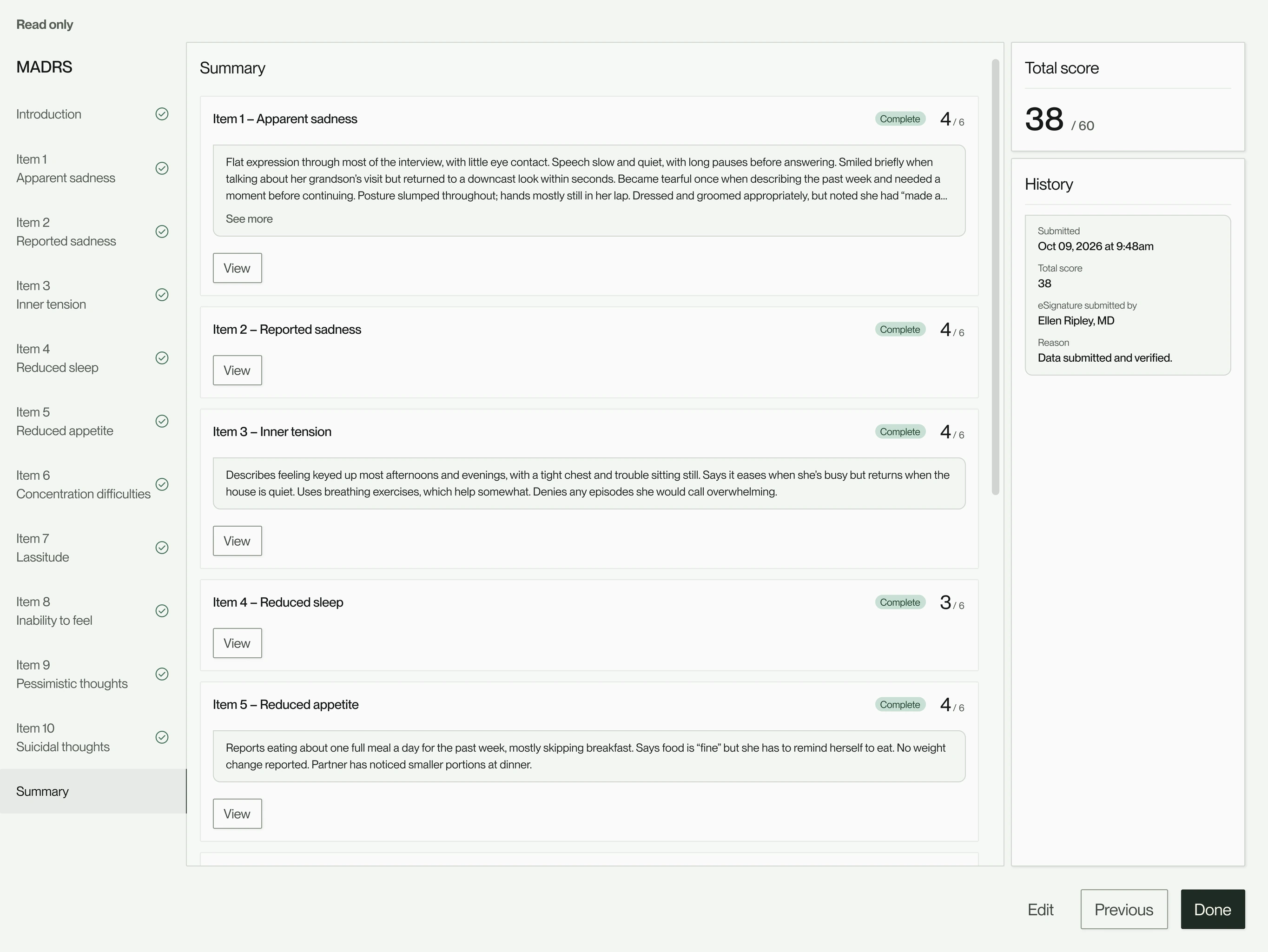
With launch two months out, we took on the raters’ core task: administering an assessment during visits. We optimized it for tablets, the device typically used during visits, and designed it in segments engineering could assemble into a template for any scale: clinician-rated scales with required recording, item navigation and notes, and patient-reported questionnaires simplified for the participant.
Every step also had to stand up to an audit. Visits and assessments record who started and finished them and when, and each Part 11 signature joins a history built for the data change requests to come.
Recording was required for clinician-rated scales, since WillisAI needs every interview. Raters had to be able to skip items, take notes on each, and pause if needed, but could not cancel. A cancel option was dropped after sites said it could count as malpractice.
With rater PINs deferred, raters signed off on assessments with their username and password, and a history panel recorded the date, time, name and score at each signing.
Patient-reported screens used larger text, recorded nothing and locked answers once submitted. Handoff screens, with short animated loops by illustrator Doug Fuchs, marked the tablet passing to the participant and back. Taking it back required the rater’s signature.
Willis would run in trials across countries, so the platform had to be ready for more than one language. At sites that ran visits in several languages, each participant’s language was recorded when they were added, so the rater knew which language the visit would be in.
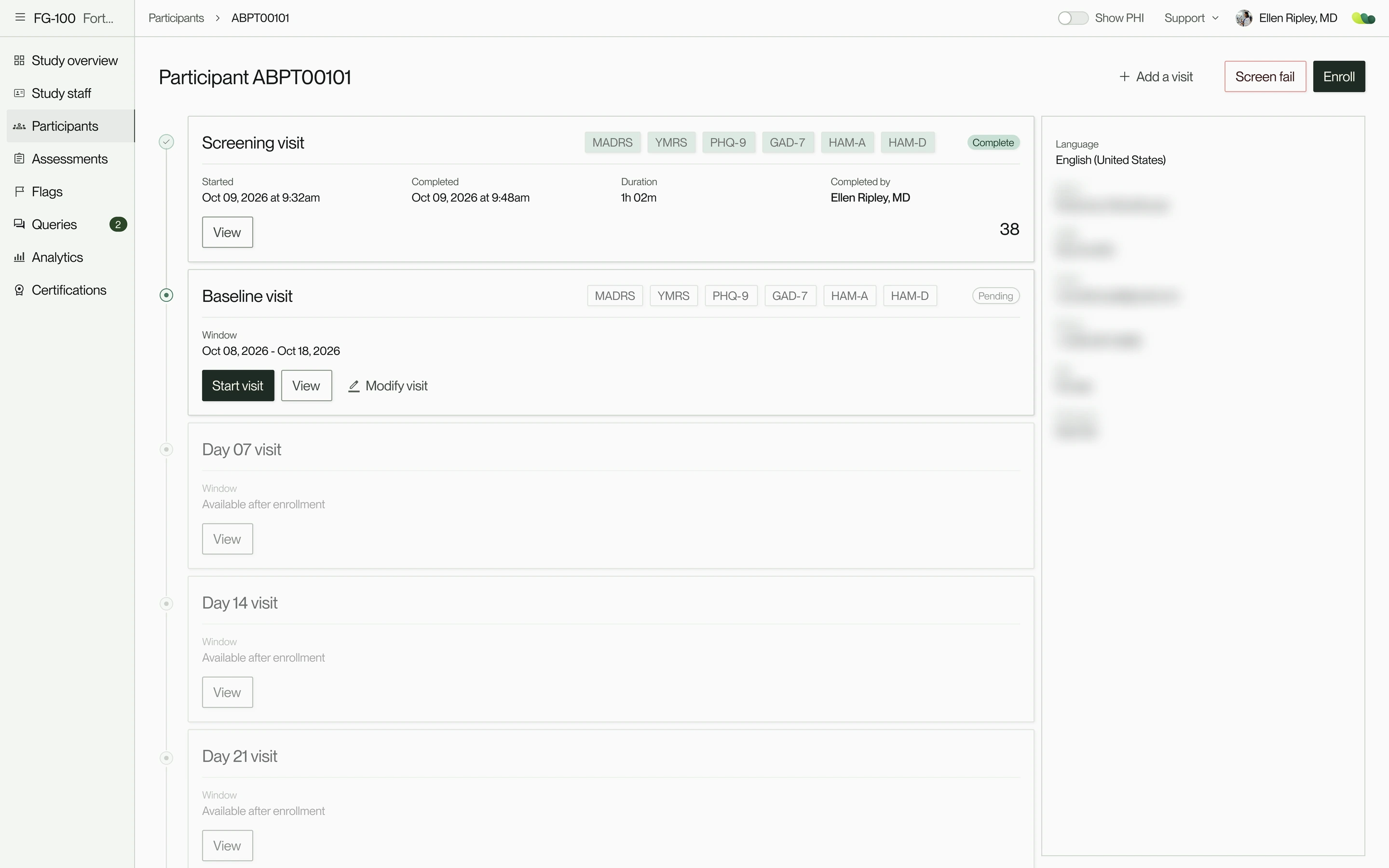
The visit header tracked each visit from pending to in progress to completed, and starting before the window required a reason.
- Any site adminAdd a participantParticipant ID and any study fields. Starts as screening; visit windows set at enrollment.
- RaterStart the visitOne click. Lists the visit’s scales. Starting early asks for a reason.
For each scale, one of two paths
Clinician-rated
- RaterRater administers itRecording runs throughout. A score and a note per item.
- RaterReview and signScores and notes on one page, signed with username and password.
- In the backgroundRecording uploadsAutomatic once the recording ends. WillisAI scores it.
Patient-reported
- RaterRater hands over the tabletA handoff screen marks the pass.
- ParticipantAnswers itLarger text, no recording. Answers lock when submitted.
- RaterTakes the tablet backWith their signature.
Then the next scale, until every scale is done
- Site staffEnd the visitRaters can edit responses until then. Ending it locks them.
May 2025
0→1 complete, $6.5M seed round raised, and our first live study preparing to onboard
On May 27, Brooklyn Health announced a $6.5M seed round led by HealthX, with Metrodora Ventures, Story Ventures and RiverPark Ventures among the investors. The pitch was demoed with the prototypes and screens we had designed.
The next day, we launched the MVP at ASCP. Sites were glad to see their feedback in the product, with assessments that looked familiar from paper and were easier to administer. When our first live study came on board that summer, sites ran visits with no training on the platform, and onboarding raised no UX issues.
At the launch party, team members carried laptops around to walk site staff, sponsors and CROs through the platform. Sponsors responded with excitement and plenty of questions: how study health would be tracked, how a flag moves from raised to resolved, and what analytics could show next.
Before the study came on board, we ran a usability test across every work path. It turned up only minor fixes and confirmed the clinician-rated and patient-reported formats. Once it was live, support requests were mostly bugs, and certifications held in the app made onboarding each new study fast.
From there, the roadmap followed what sites, sponsors and audits needed: the features left out of the MVP, and continued improvements to running visits and reading data, shaped by user feedback and usability tests.
Jun 2025 — onward
Growing beyond the MVP
After launch, Willis grew release by release: from one product to two (Willis eCOA and Willis Academy), from web to web and native iOS, and from 7 roles to 9, with permission layers each study could configure.
Looking back
Talking to users from the start mattered most. A network of PIs, raters, coordinators and sponsors would look over designs whenever we asked, so we could design alongside the people who would use the product, and a team rich in clinical and industry expertise was an invaluable resource.
If I did it again, I’d make more of those conversations informal. We treated each one as a formal session, and quick, ad hoc check-ins along the way could have helped us narrow scope sooner, trading breadth for depth and quality, and saving iterations later. The design system and operations that let a small team keep this pace are the subject of a separate case study.
There was a lot to cover in this story, and I’ve still only scratched the surface. If you have any questions or would like to hear more, please reach out to me at [email protected].
- *All screens in this case study are recreated with sample data and reflect designs developed or planned through September 2026, including enhancements and minor visual refinements. The live product may have changed since.
The product map, release by release, from the MVP to two products
- At the MVP launch, May 2025
- Added after launch, with the release it arrived in
- Willis
- BKH opsOct 2025
- UsersOct 2025
- OrgsOct 2025
- StudiesOct 2025
- AcademyMay 2026
- Training coursesMay 2026
- Training moduleMay 2026
- Scoring practiceMay 2026
- Scoring moduleMay 2026
- Interview practiceMay 2026
- AI interview moduleMay 2026
- LicensesMay 2026
- BillingMay 2026
- Organization (At the MVP launch, May 2025)
- Org info (At the MVP launch, May 2025)
- Users (At the MVP launch, May 2025)
- Account (At the MVP launch, May 2025)
- Personal info (At the MVP launch, May 2025)
- Login & security (At the MVP launch, May 2025)
- Experience (At the MVP launch, May 2025)
- Calendars & schedulingMar 2026
- Support (At the MVP launch, May 2025)
- Terms of Use (At the MVP launch, May 2025)
- Privacy Policy (At the MVP launch, May 2025)
- eCOAMay 2026
- Study (At the MVP launch, May 2025)
- Overview (At the MVP launch, May 2025)
- Participant management (At the MVP launch, May 2025)
- Add participant (At the MVP launch, May 2025)
- Participant visit (At the MVP launch, May 2025)
- ClinROs (At the MVP launch, May 2025)
- Manual entryJul 2025
- eSignature (At the MVP launch, May 2025)
- PROs (At the MVP launch, May 2025)
- Participant PINFeb 2026
- PerfROsOct 2025
- VisitsMar 2026
- Central rater schedulingMar 2026
- Clinical sites (At the MVP launch, May 2025)
- Staff management (At the MVP launch, May 2025)
- Add staff (At the MVP launch, May 2025)
- CRO staff (At the MVP launch, May 2025)
- Site staff (At the MVP launch, May 2025)
- Review staffFeb 2026
- Central rater staffMar 2026
- Assessments (At the MVP launch, May 2025)
- WillisAI review (At the MVP launch, May 2025)
- COA recording playbackOct 2025Also linked to Secondary review and Endpoint quality
- Secondary reviewMar 2026
- Analytics (At the MVP launch, May 2025)
- Endpoint qualityJun 2026
- Clinical measures (At the MVP launch, May 2025)
- Flags (At the MVP launch, May 2025)Also linked to Flags under Study
- Enrollment (At the MVP launch, May 2025)
- Flags (At the MVP launch, May 2025)
- QueriesAug 2026
- Create queryAug 2026
- Certifications (At the MVP launch, May 2025)
- Training module (At the MVP launch, May 2025)
- Virtual patientNov 2025Also linked to Evaluation module
- Evaluation moduleOct 2025
May 2025MVP launch Jul 2025Release 25.07 Oct 2025Release 25.10 Nov 2025Release 25.11 Jan 2026Release 26.01 Feb 2026Release 26.02 Mar 2026Release 26.03 May 2026Release 26.05 · Academy Jun 2026Release 26.06 Jul 2026Release 26.07 Aug 2026Release 26.08